Files, Office co-editing and AI, hosted in France

The AI-ready European alternative to Microsoft 365

Lena brings together file storage and sharing, co-editing of Word, Excel and PowerPoint documents, search and AI, for SMEs and industry. Your data stays in France.

Free for up to 3 users.
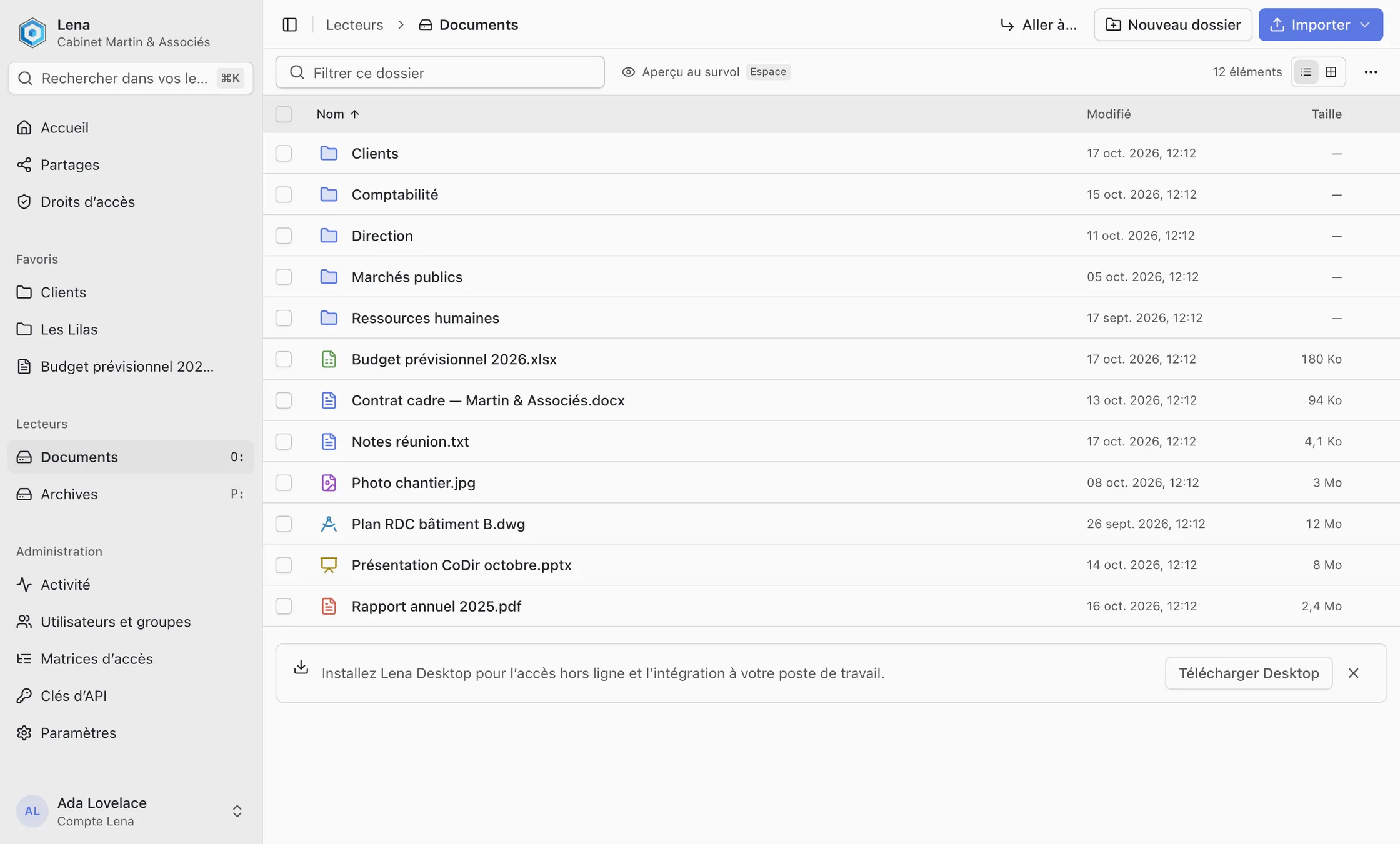
Lena Web: folders and files of the “Documents” drive, with the sidebar (home, shares, access rights, favourites, administration).
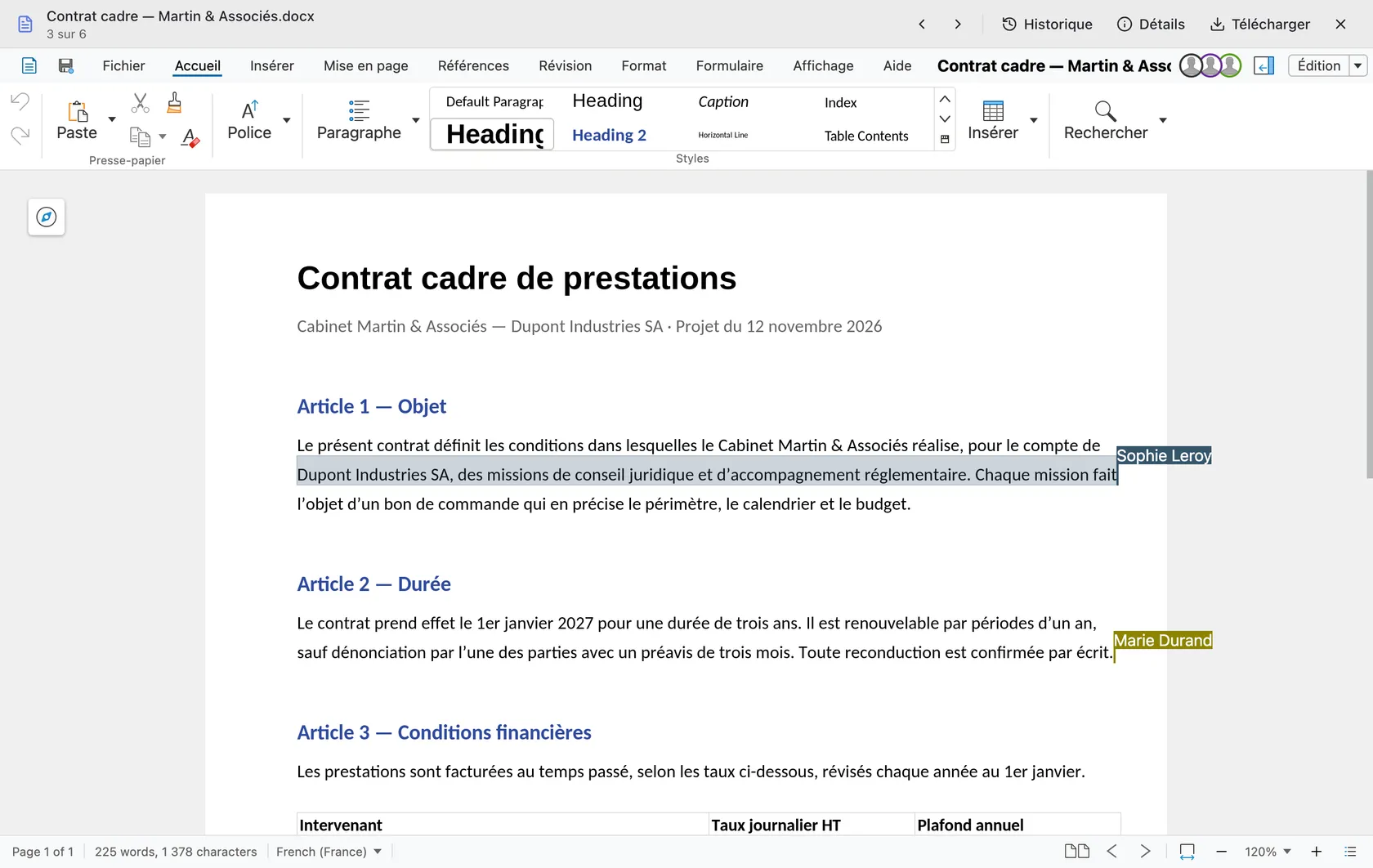
Lena Office: a Word contract edited by three people at the same time, with each name next to its cursor.

Shown in French; Lena is also available in English.

Files

All your files in Explorer, without filling the disk

On Windows, Lena is a drive in Explorer. Anywhere else, a browser is enough.

  • On demand: a file is downloaded only the first time it is opened.
  • Offline: the folders you choose stay on the computer.
  • Browser: macOS, Linux, tablet or phone, with the same rights.
Windows Explorer: the “Projet Convoyeur” folder of the Lena drive (L:), listed under “Ce PC” next to the C: disk, with its sub-folders and its CATPart, STEP, DXF, Word, Excel and PDF files.
The Lena drive in Windows Explorer.

Lena Office

Work together in the same document

Word, Excel and PowerPoint documents open in the browser. Everyone sees the others’ changes live.
  • Co-editing: several people write in the same file at the same time.
  • With outsiders: a client or a supplier joins through a link or a room, with nothing to install.
  • Nothing to merge: a single file, and every save becomes a version.
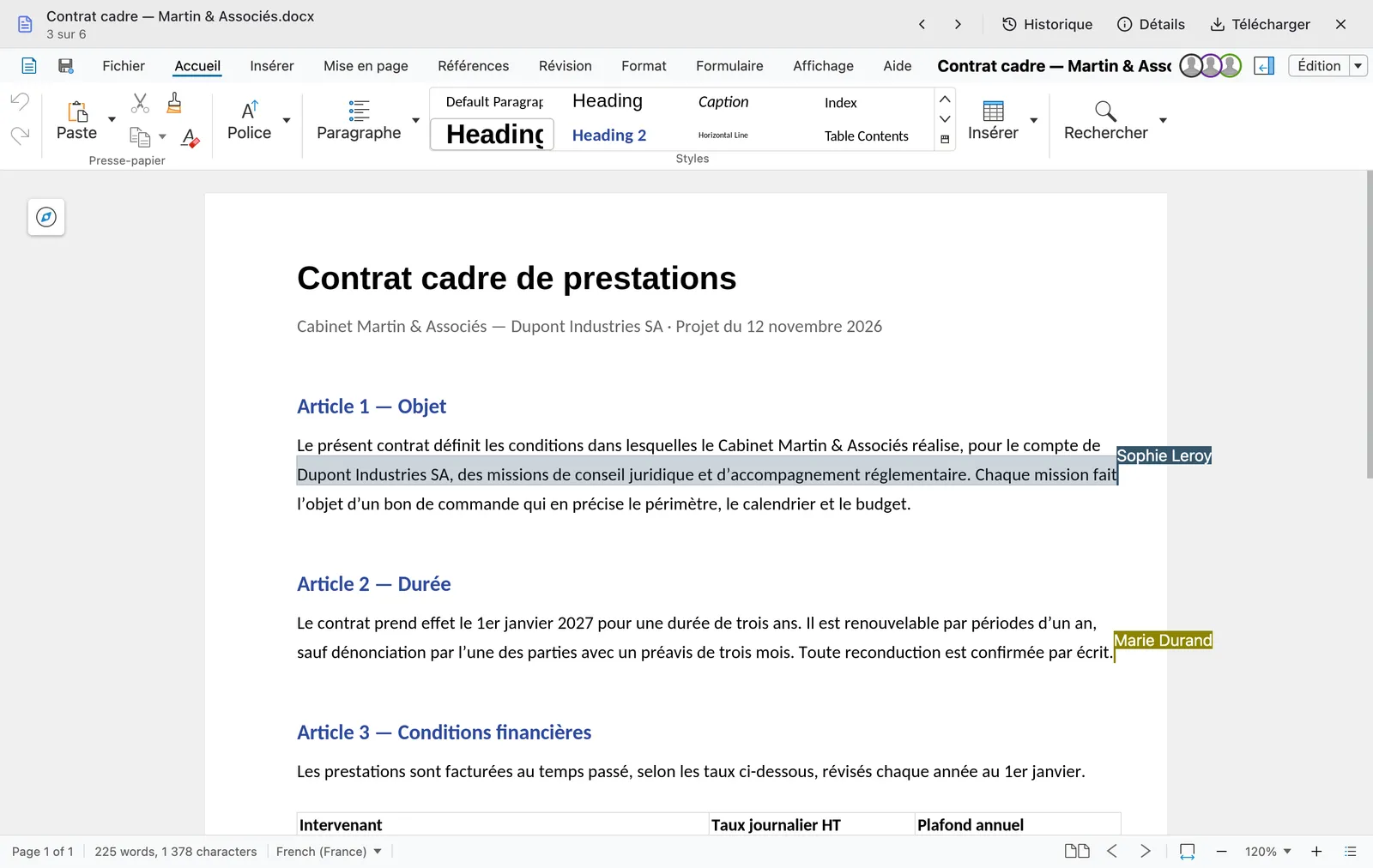
A Word contract open in Lena Office by three people, whose avatars are at the top right: Sophie Leroy’s selection and Marie Durand’s cursor appear in the text, each with their name.
Three people in the same Word document.

Search and AI

Search, question and put your documents to work with AI

Lena’s AI features rely on the models of Mistral AI, a French company.
  • Search: by name, in the content by meaning, in images by their description.
  • Assistant: it reads the relevant documents and answers with citations.
  • Rights respected: the AI only reads what you are allowed to read.
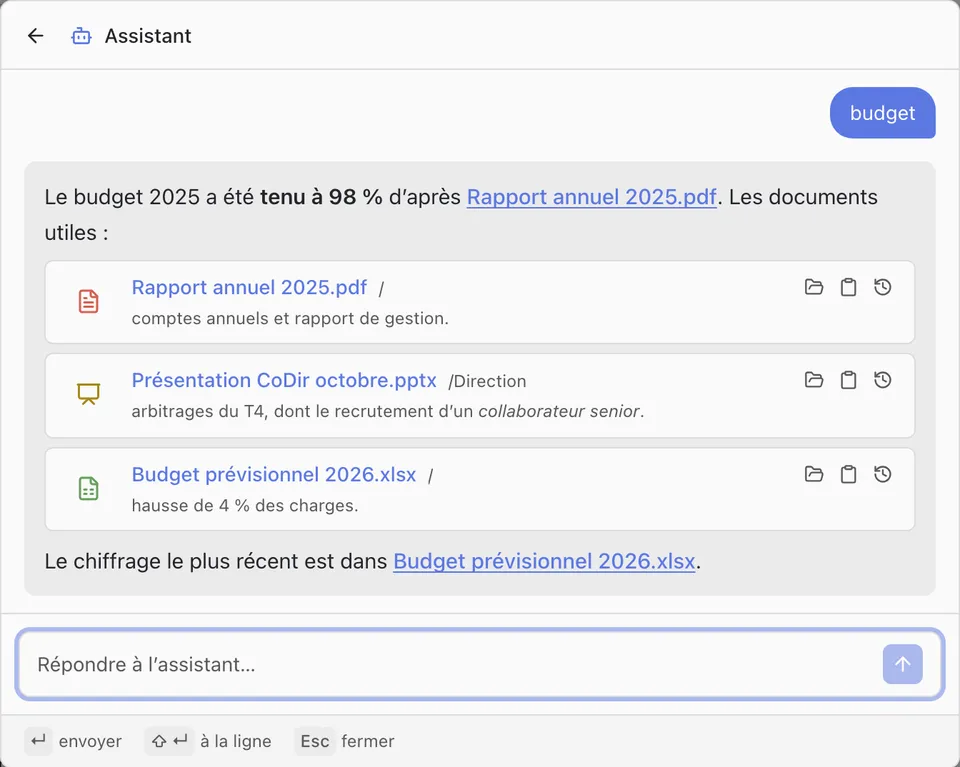
Assistant window: to the question “budget”, the answer states that the 2025 budget was met at 98% and cites three documents, with an excerpt of each.
The assistant answers and cites the documents it read.

Industry

Open a CAD part without CAD software

3D models and drawings are displayed in the browser and in Windows Explorer.
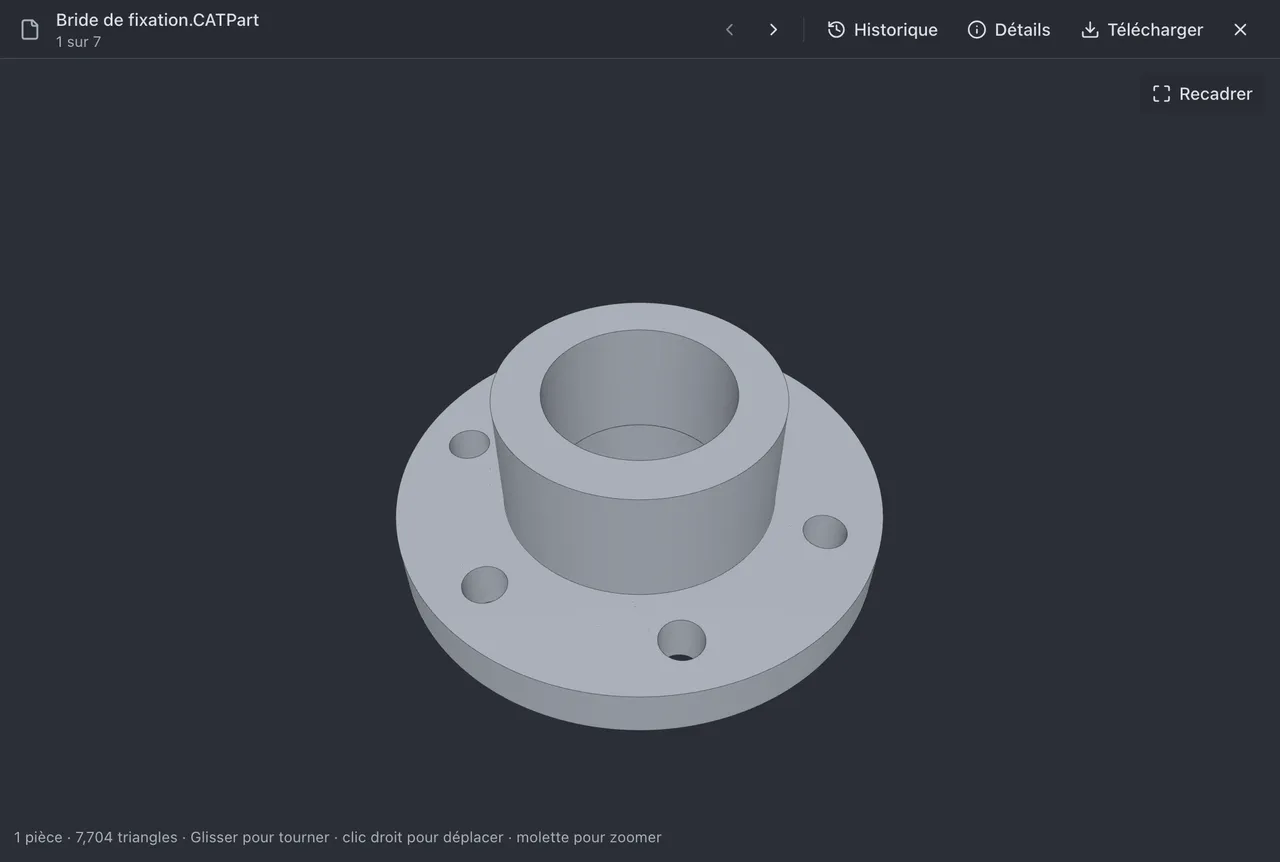
  • Formats: CATPart, STEP, IGES, IFC, STL, DXF and others.
  • In Explorer: the Windows preview pane displays the part.
  • When shared: a client or a subcontractor opens the model from a link, with nothing to install.
3D viewer of Lena Web: the part “Bride de fixation.CATPart”, a flange with six holes, displayed as a solid, with the Recadrer, Historique, Détails and Télécharger buttons.
A CATPart file opened in the browser.
Windows Explorer, “Projet Convoyeur” folder of the Lena drive: the file “Arbre porte-roulement.CATPart” is selected and the preview pane displays the part in 3D.
A CATPart file in the preview pane of Windows Explorer.

Access rights

Decide who sees, reads or edits each folder

Rules per user or per group, inherited from folder to folder.
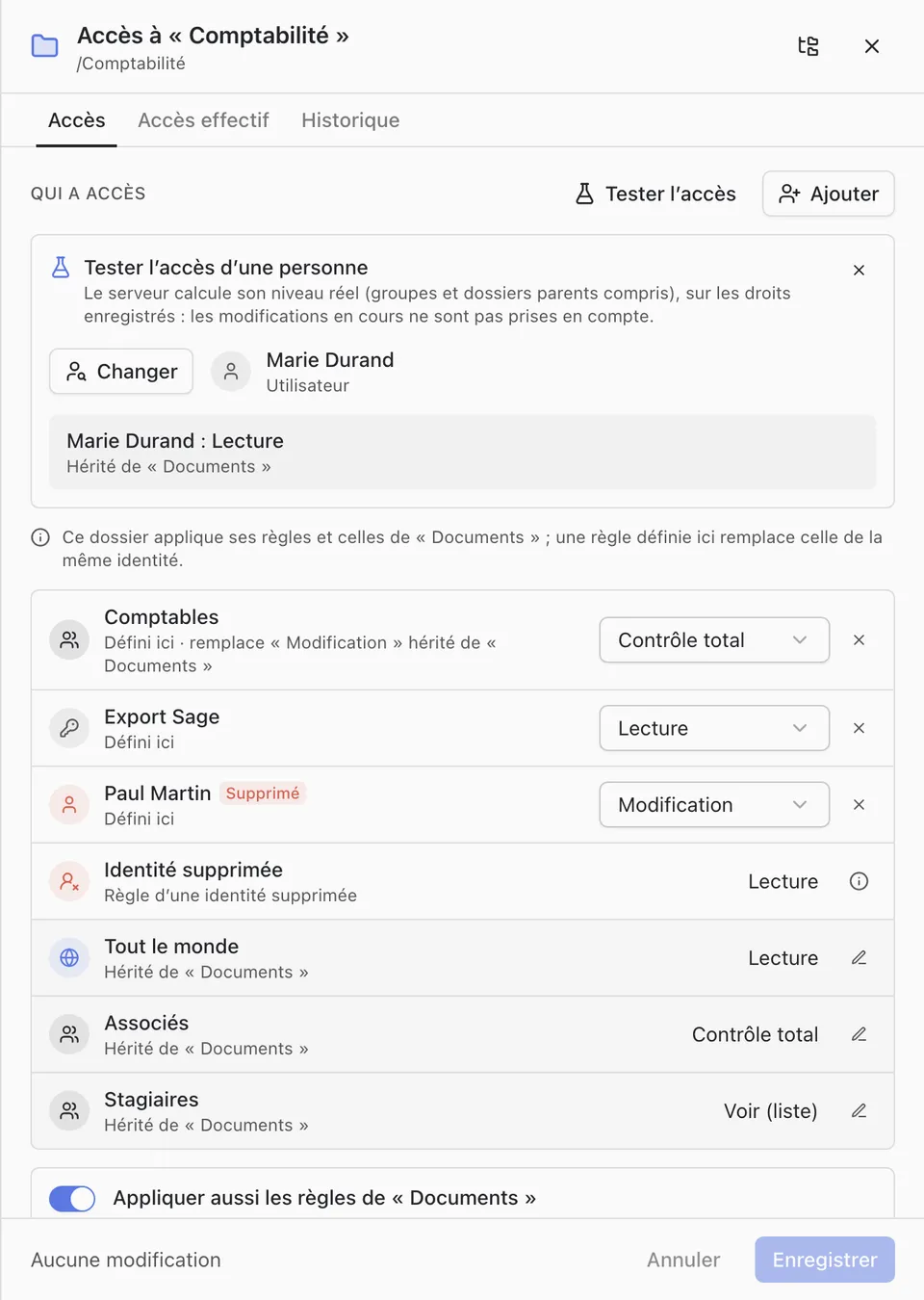
  • Five levels: from “no access” to “full control”.
  • Test an access: a person’s actual level, groups and inheritance included.
  • History: every change of rights is dated and attributed.
“Access to Comptabilité” panel: test of Marie Durand’s access (read, inherited from Documents), then the list of rules per group and per person with their level.
Rules of a folder and test of one person’s access.

Protection

Restrict what a computer can do with a sensitive folder

On top of access rights, for the most sensitive folders: drawings, quotes, HR files.
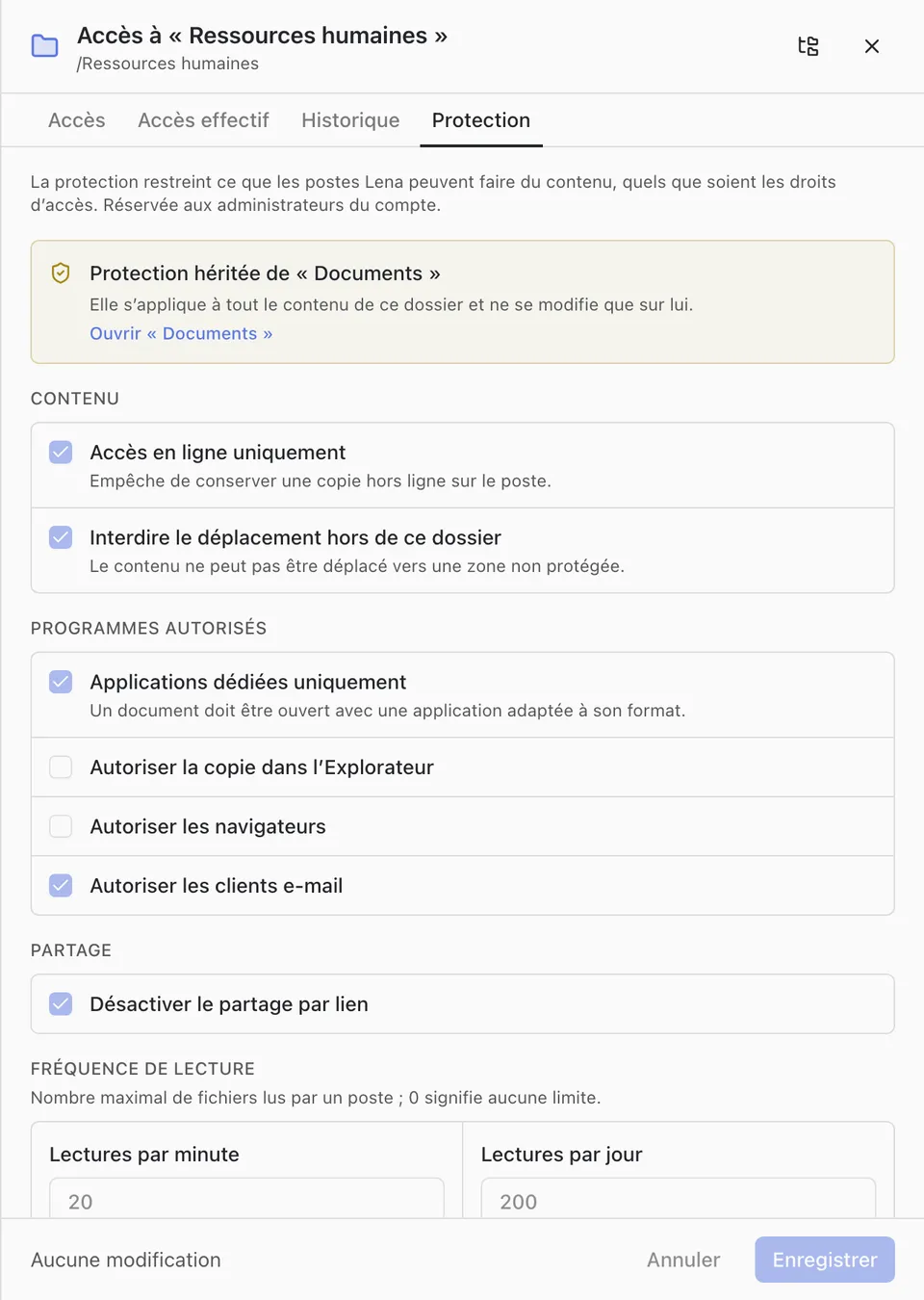
  • Online only: no offline copy on the computer.
  • Programs: only authorised applications open the files.
  • Limited reads: a mass copy of the folder is stopped.
“Protection” tab of the Ressources humaines folder: online access only, no moving out, dedicated applications only, link sharing disabled, reads per minute and per day.
Protection settings of a folder.

Sharing

Share with outsiders, by link or in a room

Clients, suppliers, subcontractors: the people who have no account in your organisation.
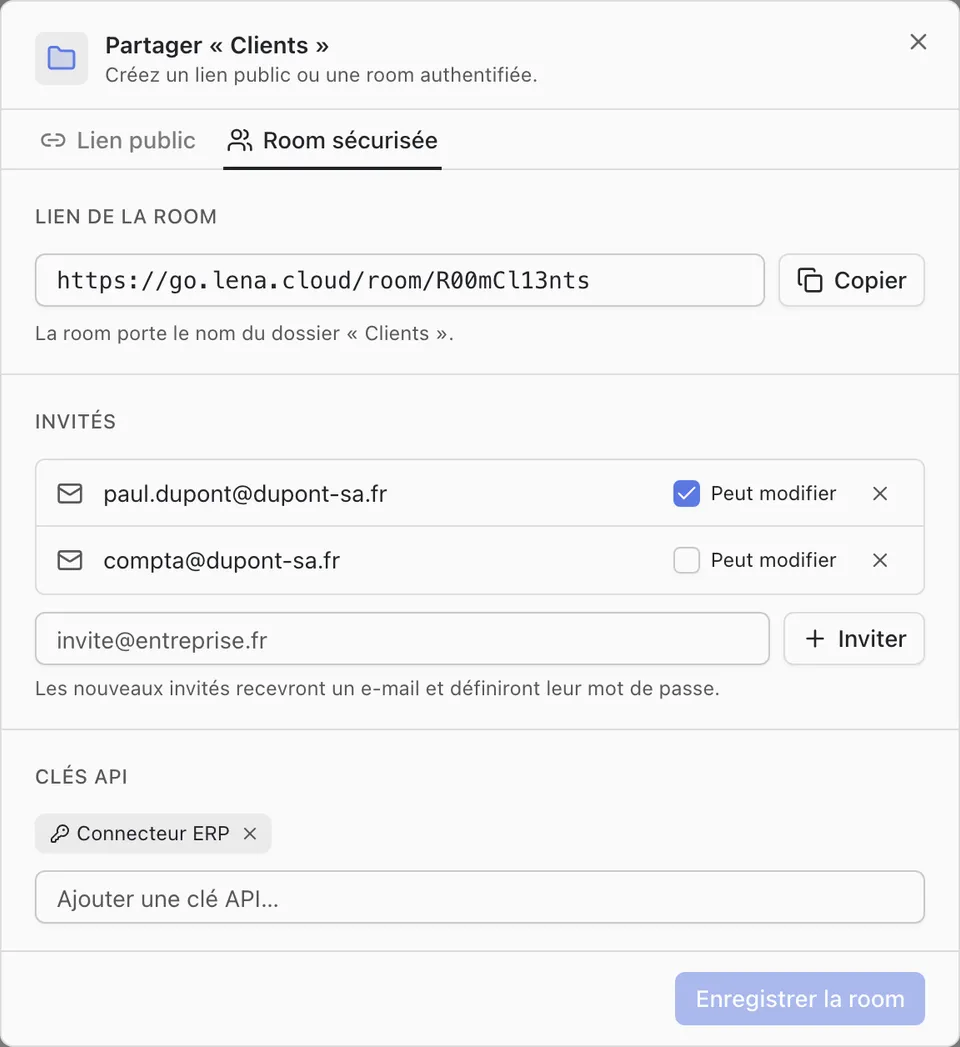
  • Public link: with an expiry date, read-only or editable.
  • Secure room: named guests, each with their own account and rights.
  • Quotas: a number of files that can be shared per week.
“Share Clients” window, Secure room tab: link of the room, two guests of whom one can edit, a field to invite an e-mail address.
Secure room: named guests, edit right per guest.

History

Get back a version, or a folder as it was on a given date

The server keeps every save of every file.
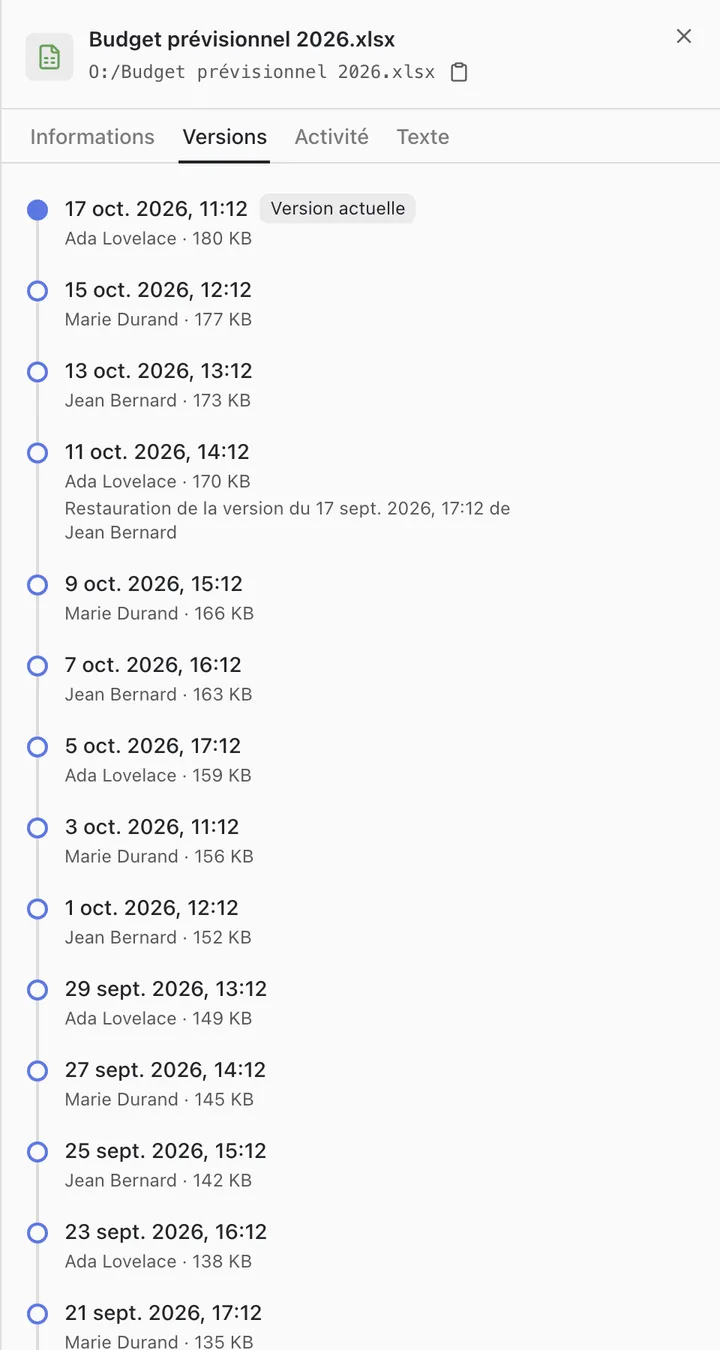
  • Versions: open or restore any of them.
  • View as of a date: a whole folder as it was, deleted files included.
  • After ransomware: the earlier versions remain on the server.
Details panel of the file “Budget prévisionnel 2026.xlsx”, Versions tab: about twenty dated versions, with their author and size.
Versions of a file, from the most recent to the oldest.

Activity

Know who read, changed or shared a file

One log for the whole account, filtered by person, folder and period.
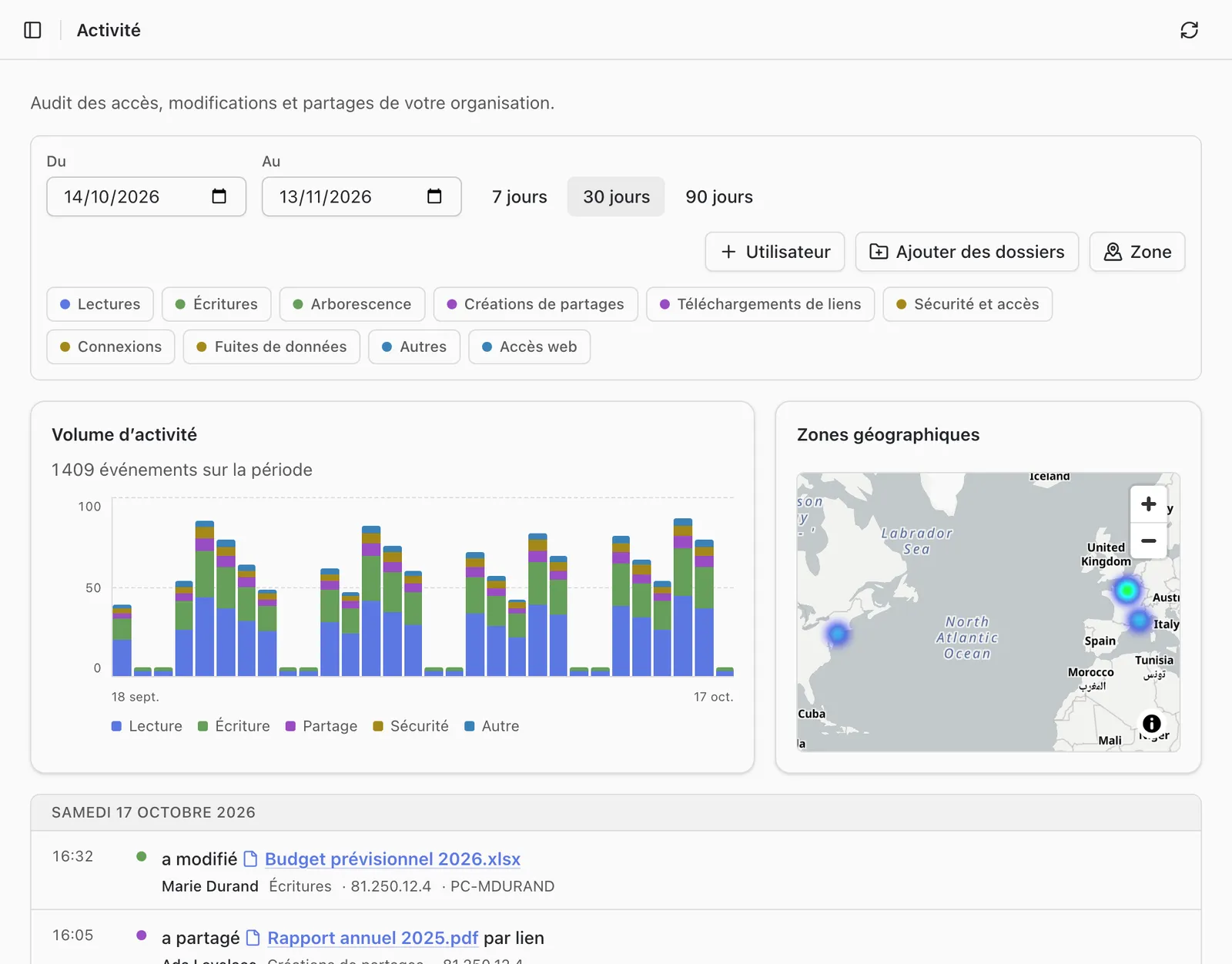
  • Events: reads, changes, shares, sign-ins, denied accesses.
  • Origin: the computer or browser behind each action.
  • Map: the geographic areas the activity comes from.
Activity page: filters by period and type, histogram of activity over 30 days, map of geographic areas, then the detailed log day by day.
The administrator’s Activity page.

API

Connect your software to Lena

A REST API to connect your ERP or business tools to files, links and rooms.
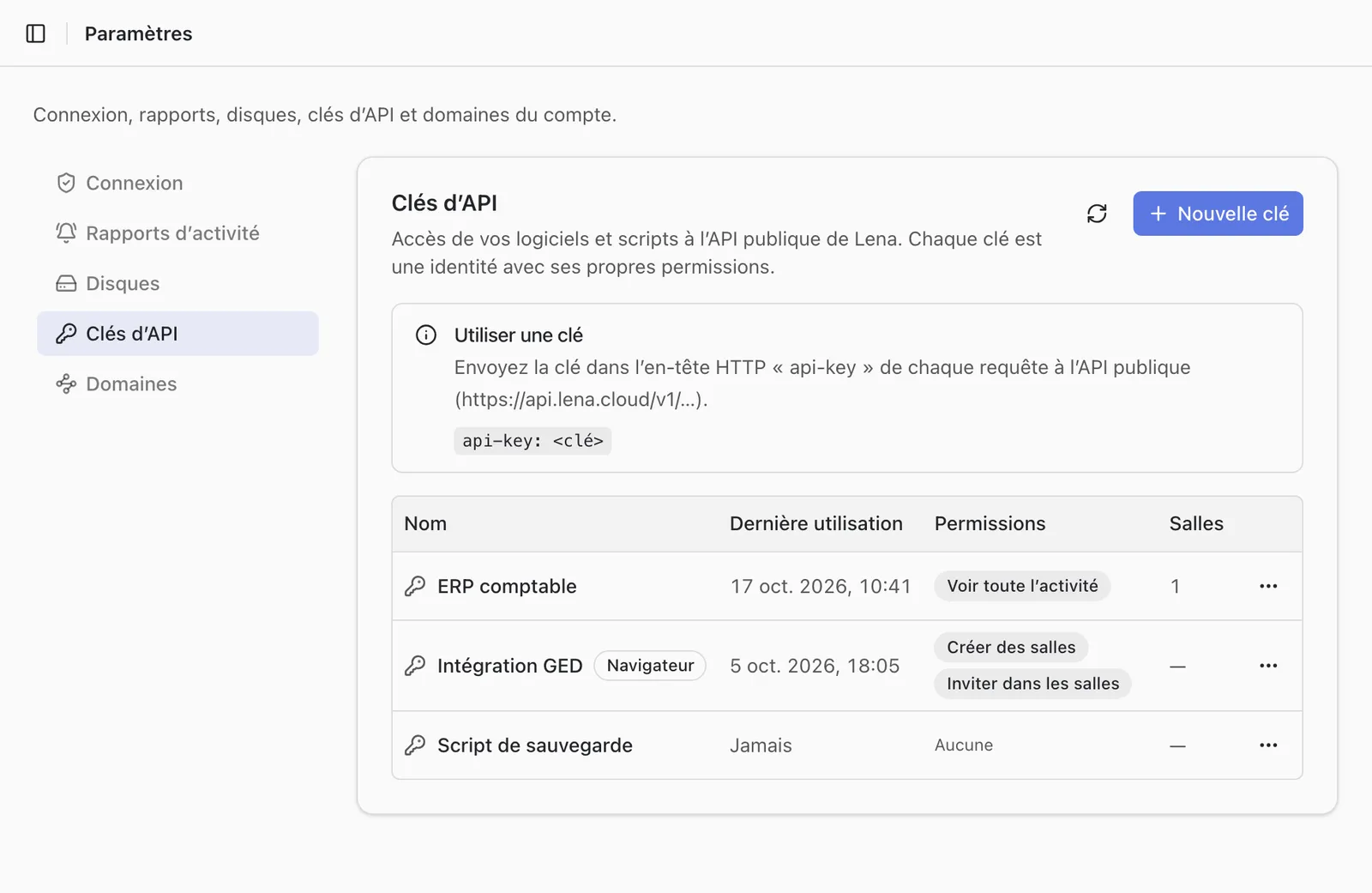
  • API keys: each key has its own rights.
  • Traceability: its actions appear in the log under its name.
  • Ready for your AI tools: the text of every document is available as Markdown.
Settings, API keys tab: how to use the api-key header and a list of three keys with their last use and permissions.
API keys of the account.

Hosting and confidentiality

  • Servers in France

    Files, versions and indexes are stored at OVHcloud, in France.

  • Sovereign AI

    AI features rely on the models of Mistral AI, a French company.

  • Encryption

    All exchanges are encrypted, as is the local copy on Windows computers.

  • Rights checked by the server

    Every read, write or share is authorised by the server.

Pricing

Frequently asked questions

Does Lena replace Microsoft 365?

For files and documents, yes: storage, sharing, and co-editing of Word, Excel and PowerPoint documents. Lena provides neither e-mail nor video meetings.

Which systems does Lena run on?

The desktop client is available for Windows. On macOS, Linux, a tablet or a phone, Lena is used in the browser.

Where are the files stored?

At OVHcloud, in France.

Can we work offline?

Yes, in the folders kept offline, if the account administrator allows it. Changes are sent when the network is back.

How do we recover an overwritten or deleted file?

Through its versions, or by reopening its folder as it was on an earlier date.

How do we get started?

Create your organisation online, then install the Windows client. It is free for up to 3 users.

Write to us

A question, a quote or a demonstration.

Or by e-mail: contact@lena.cloud