
Lena Help › Access rights and protection
Manage rights by folder category (access matrices)
Classify folders by category and set in a matrix the access level and sharing right of each group.
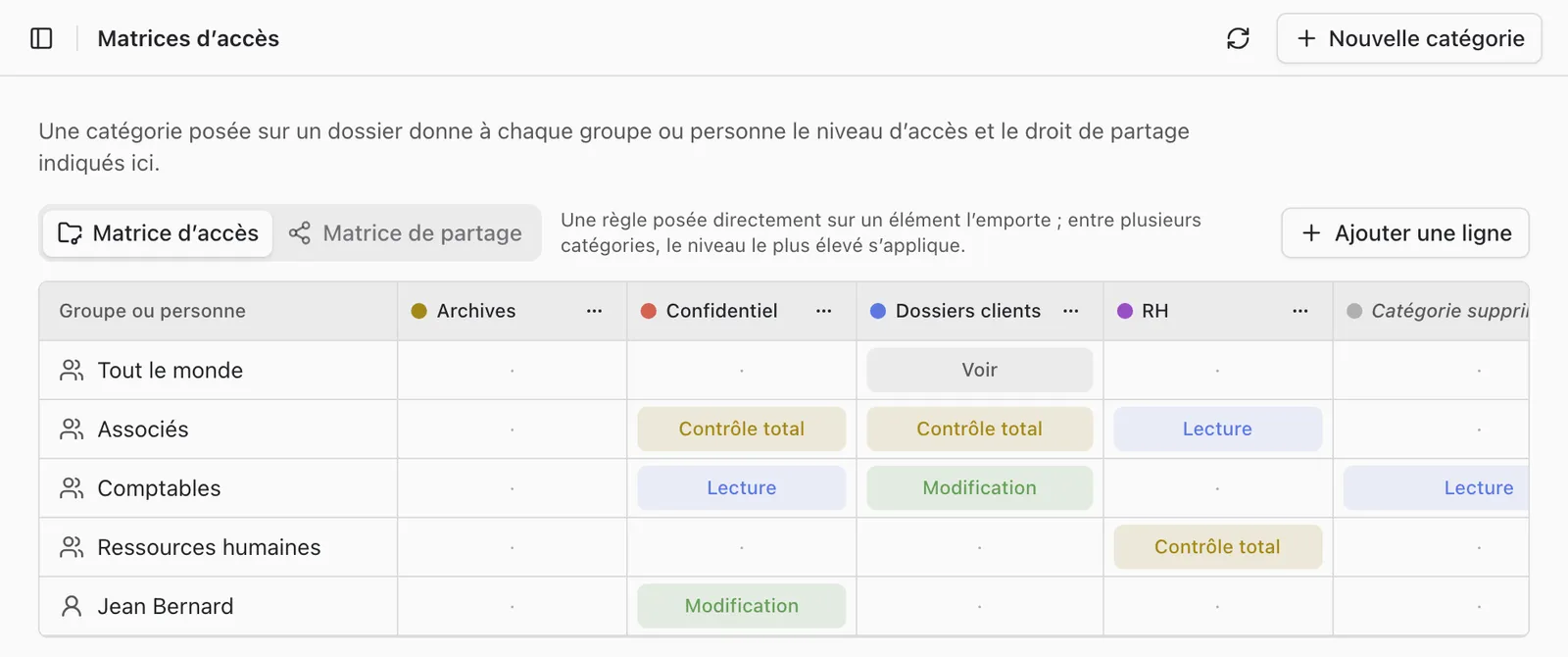
A category set on a folder gives each group or person the access level and link sharing right recorded in the account’s matrices. You thus set in one place the rights of all the folders of the same category.
The two matrices
The “Access matrices” page of Lena Web (“Administration” section) requires the “Manage access matrices” permission or the account administrator permission. Each category forms a column there, each group or person a row.
- “Access matrix”: the level of each row on the folders of the category.
- “Sharing matrix”: what each row may share by link among these folders (unlimited, a number of files per week, or denied). A quota set on a user’s or group’s panel replaces it.
Set a category on a folder
Right-click the folder, “Access”, then “Categories”. You must be a manager or an owner of the folder.
Priority rules
- A rule set directly on an item wins over the matrix.
- Between several categories, the highest level applies.
- A category counts as a rule for inheritance.
Delete a category
Its cells are removed from both matrices. The folders that carry it keep it as a mere mark, with no right attached: check their access after the deletion.
A question not answered here? Write to us: contact@lena.cloud